Design Challenge
To pinpoint a feature from an existing application and create a new and independent digital product based on the chosen feature.
After collecting a batch of 20 potential applications to unbundle, I narrowed down my selection to top 5 apps based on features of interest. From this smaller batch I made my final selection, choosing to focus my design solution on payment transfer.
Problem Space

Freelance designers, much like anyone else who is self-employed, are tasked with managing and tracking their own payment schedule. Making sure that all clients make timely payments for services rendered can be a daunting task, and undoubtedly special circumstances will arise, making way for late or missed payments.
The design professional must choose the best way of executing and tracking these financial transactions. Although there are a number of options and software available, none seem as quick, intuitive or successful as mainstream personal payment apps such as Venmo or PayPal.
Research
I conducted interviews to learn more about prospective users’ current payment experiences, as well as payment methods they find useful and those that they do not.
Interviews
Participants
6 Interviewees
Freelancers
Ages 26-39
Philadelphia Area
Questions
Which payment transfer applications have you used to send or receive money in your personal life?
What are some features you like about the application(s)?
Are there any elements you don’t find particularly useful, or any that you feel could use improvement?
As a freelance designer, which method of payment would you say you have encountered most frequently from your clients to date?
Currently, what is your method of organizing and keeping track of client payments?
How many days do you typically give your clients to make a payment in full?
Have you experienced issues with clients in the form of late payments and/or the need to send reminders?
If you use an invoicing software and/or obtain clients through freelancing platforms, what are some of the fees/rates that you have encountered so far?
Do you find elements of social media communication (such as the ability to message, like, and add users to your network) to be beneficial to a payment transfer application?
If you handled a financial transaction between yourself and a client entirely within the framework of a payment platform, would you still find it appropriate to receive a mandatory email confirmation providing you with a sort of ‘transaction receipt’?
Affinity Diagramming
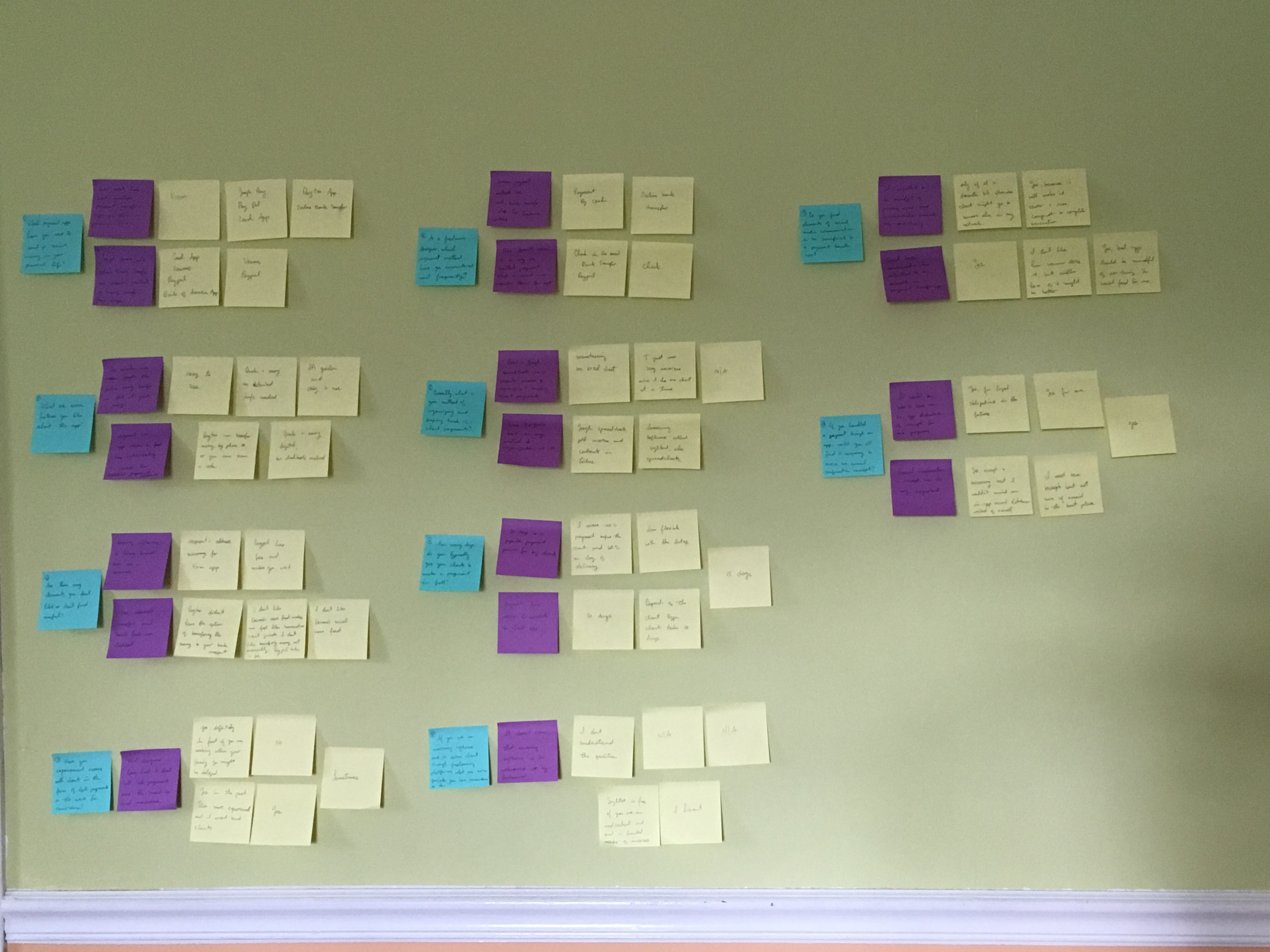
Creating an affinity diagram helped me sort group interview responses and extract valuable insights.
Insights
- Most People have used multiple payment transfer application in their personal lives.
- PayPal, Venmo, and online bank transfers are popular methods of money transfer these days.
- The number one reason people like online money transfers is that it’s quick and easy.
- Payment via app seems to feel less intimidating and less formal than traditional payment methods.
- Requiring too much information or having a long transfer time are nuisances that people try to avoid when choosing a payment transfer application.
- Fees, manual bank transfer initiations, and privacy concerns regarding social feeds are a few disadvantages to payment apps.
- Common payment methods for freelance services are cash, bank transfer, and check payments.
- Excel and Google spreadsheets are a popular means of organizing and tracking client payments.
- 30 days is a popular payment period for designers working with bigger clients.
- Most designers have had to deal with late payments and/or the need to send invoice reminders.
- It doesn’t seem that the use of existing invoicing software is currently in widespread use by freelance designers.
- It’s important to be mindful of privacy and to keep communication discrete in a payment platform handling professional services.
- Elements of social media communication have potential to be of value, only if used properly.
- It would be nice to have an in-app database of receipts for tax purposes.
- Email confirmation and receipts are still very important.
Design Solution
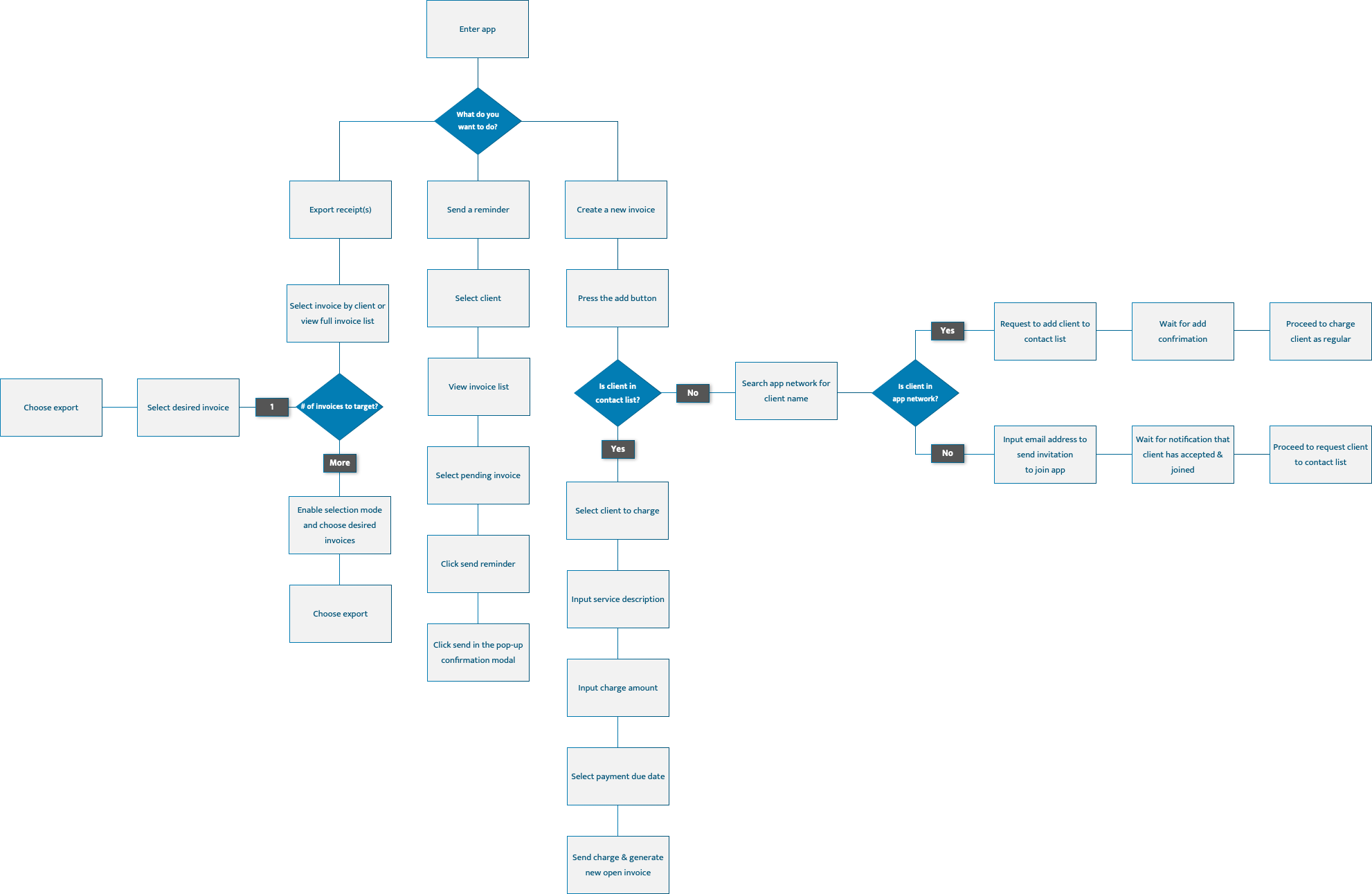
Informed by my research, I drafted a user flow detailing the main pathways that would be available to the user through the Golancer app. These pathways satisfy one of three user goals:
Create a new invoice
Send client reminders
View & export invoice history
User Flow
Feature Maps
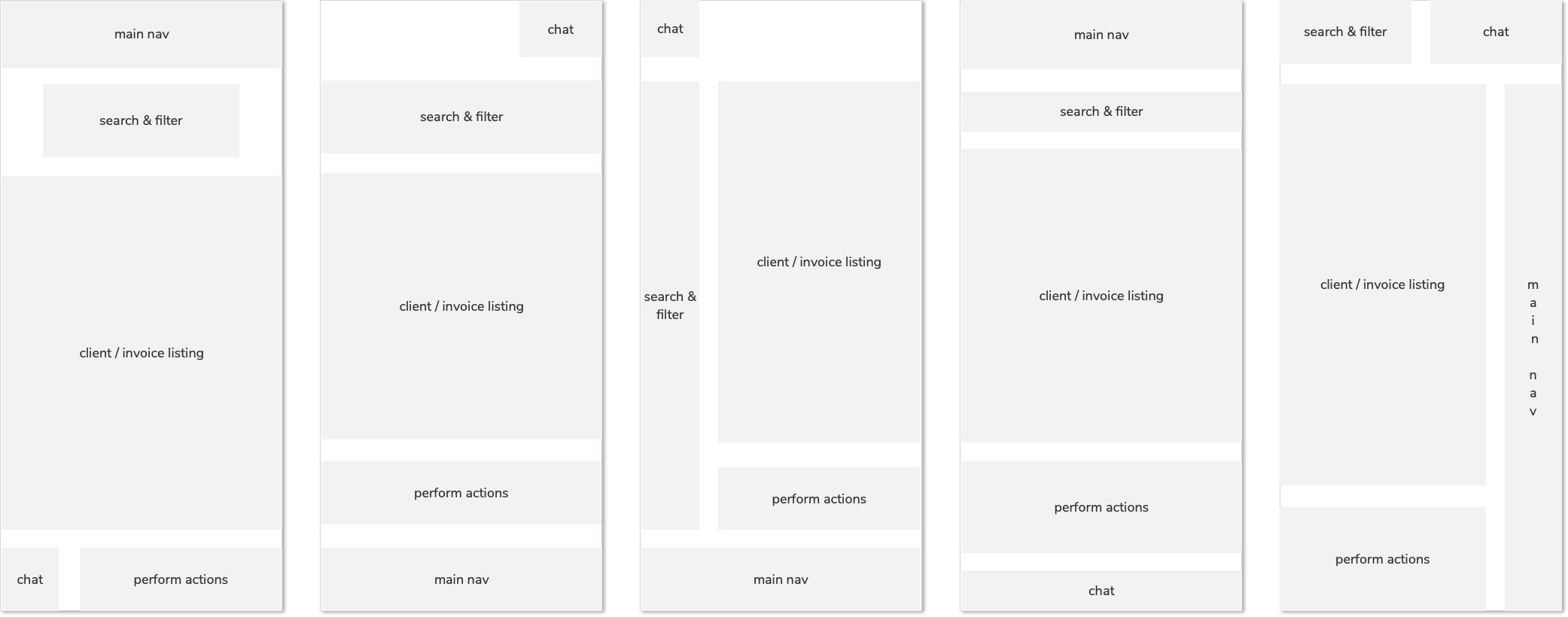
Based on the user flow, I came up with several feature maps to demonstrate possible layouts for the interface.
Wireframes
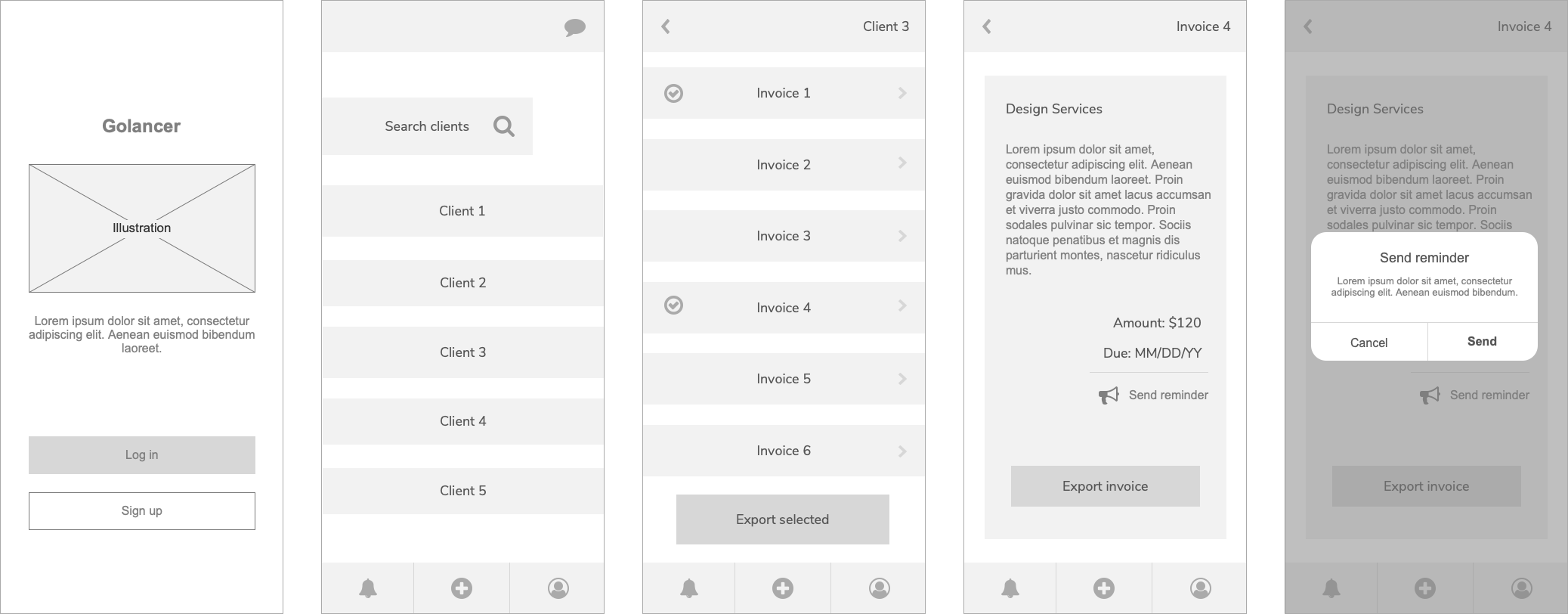
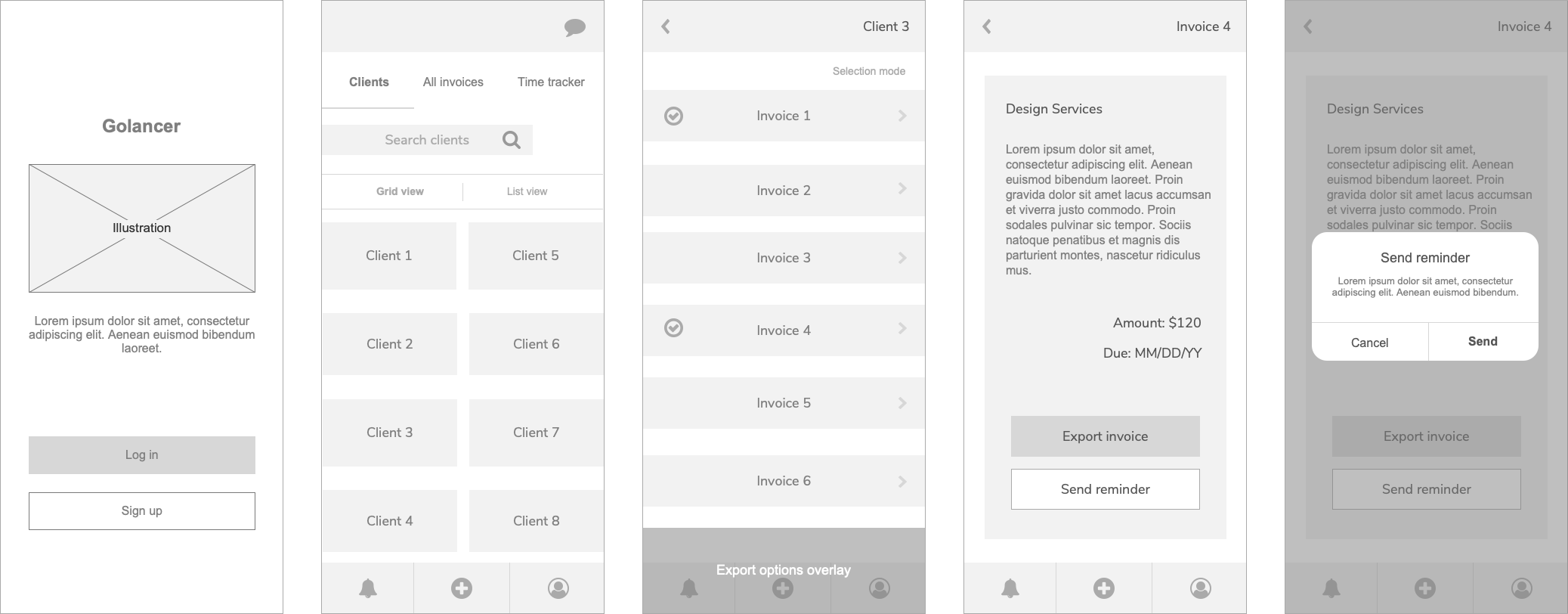
I selected the strongest layout from the group, and expanded upon it to create key wireframes. These flows represent use case scenarios exporting a selection of invoices or sending a reminder to a client.
1st iteration
User Testing Feedback
I presented my wireframes to users and gained helpful insights:
- Send reminder option should be more prominent
- Expand on filter and search features
- Enhance display organization, making better use of real estate and giving a more intuitive feel
- Integrate a time-tracking feature into the app
These findings prompted me to create a second iteration of the wireframes.
2nd iteration
Visual Design
In the final step, I moved on to visual design, skinning the wireframes with a color palette appropriate for a finance app. I chose cool neutrals and blues, with a pop of orange, green and red icons. These colors communicate security, trust and authority.

 Irina Dokova
You must be logged in to post a comment.